AI Tokenomics on Google Cloud: What Your Gemini App Is Really Paying For
A Gemini support agent processes more than the user’s question: it also reads instructions, conversation history, retrieved documents, and tool results. This guide follows one request to show how those inputs affect token use, cost, and the choices you make before scaling the application.
In this guide — jump to a section
What Gemini Processes Alongside the User’s Question
Suppose you have built an internal support agent on Google Cloud. One morning, an engineer asks:
The question is short, but the application may send much more information with it.
Your app may also send a system prompt, the recent conversation, several chunks from a runbook, tool definitions, and the result of a log query. If you use a thinking model, Gemini may also do extra reasoning before it writes the answer.
So the useful question is not “How long was the prompt?” It is “How much information did Gemini have to process to finish the job?”
So, What Is a Token?
A token is a small piece of information the model processes. It is not the same as a word. One short word may fit into a token; another word may be split into several. Punctuation, code, JSON, spaces, and other text all contribute.
Gemini is multimodal, so this is not only about text. Images, audio, video, and PDFs are also turned into units the model can process. The exact token count depends on the model and the kind of content you send.
You will sometimes see rough rules such as “a token is about four characters.” That can help with back-of-the-envelope thinking, but it is not how I would size a production request. Google provides token-counting tools for a reason: when the number matters, count it.
Follow the Tokens in One Support Request
Let’s stay with the checkout incident and look at an example request.
System instructions: 900 tokens
User question + recent chat: 600 tokens
Runbook and incident notes from RAG: 4,500 tokens
Tool definitions: 700 tokens
Log-query result sent back to Gemini: 2,500 tokens
Reasoning + final response: 1,300 tokens
Where would I look first?
The user question is not the problem in this example. The retrieved runbook and log result are.
If this request becomes expensive, inspect retrieval and tool output before spending time shaving a few words off the prompt.
The exact numbers will be different in your application. The pattern is what matters.
Here, the user’s message is small. RAG and tool output are doing most of the work.
Before Optimizing Anything, Find Out Which Tokens Are Growing
Input and output are enough for a basic chatbot. Agents and thinking models add a few more places for tokens to accumulate.
| Token bucket | What it means in plain English | Where you might see it |
|---|---|---|
| Input | What Gemini had to read. | User prompt, system prompt, chat history, RAG text, tool descriptions, media. |
| Cached input | Repeated context that Gemini can reuse instead of processing as completely fresh input. | Large manuals, stable instructions, repeated code or reference material. |
| Output | What Gemini generated for the request. | The answer shown to the user. |
| Thought / reasoning | Reasoning used by applicable thinking models before the final answer. | Complex planning, analysis, multi-step problem solving. |
| Tool-use related context | Information that moves between the model and tools during an agent run. | Database results, log output, API results, function responses. |
You do not need to memorize the API fields. Use the categories diagnostically: high input usually points to context; high reasoning/output points to model behavior; large tool-related context points to what your tools are sending back.
Choose How Much Context the Request Needs
Gemini can work with very large amounts of context. That is useful for codebases, documents, transcripts, audio, video, and long conversations.
But “the model can accept it” and “the model needs it” are different statements.
Think of the context window as a desk. A bigger desk is helpful. Covering it with every document in the office is not. Extra context can add cost and latency, and irrelevant material can distract from the evidence that matters.
Turn Tokens Into a Cost per Request
Google Cloud usually quotes Gemini inference prices per one million tokens. Input and output have separate rates, and cached input can have a much lower rate. The exact price depends on the model, location, and request type.
As of September 16, 2026, Google lists Gemini 3.5 Flash-Lite standard global pricing at $0.30 per 1M input tokens, $0.03 per 1M cached input tokens, and $2.50 per 1M text output/reasoning tokens.
Take a small request with 4,000 normal input tokens and 500 output/reasoning tokens:
Input
4,000 / 1,000,000 × $0.30 = $0.00120

Output
500 / 1,000,000 × $2.50 = $0.00125

Approximate model-token cost
= $0.00245 per request

100,000 similar requests
≈ $245
What should you calculate first?
Start with cost per request, then multiply by realistic traffic.
After that, split the request into input, output/reasoning, and repeated context. That usually tells you whether the bigger opportunity is model choice, smaller context, or caching.
Estimate costs at your expected traffic volume, including long prompts, large tool results, repeated context, and multiple agent calls.
Also remember that this is only an example of model-token pricing. Grounding, cache storage, and other services can have separate charges. Prices change too, so I would always keep the live pricing page next to any cost estimate.
Repeated Context Is the Easiest Place to Stop Wasting Tokens
Suppose every support question includes the same 20,000-token operations manual. The first request has to process it. The hundredth request should make you ask why it is still being treated as brand-new input.
That is the problem context caching is meant to solve. Google Cloud supports implicit caching and explicit caching.
Implicit caching
You keep sending repeated content and Gemini can automatically benefit from a cache hit when the request qualifies.
Explicit caching
You decide which large, stable content should be cached and then reference that cached content in later requests.
Google says cache hits on supported Gemini 2.5-and-newer models can be charged at 10% of the normal input-token rate.
Consider caching when large, stable content is reused often enough to justify the storage and management costs.
Official Google Cloud Tech video: a useful visual explanation of Gemini long context and context caching.
Agents Change the Math Because One User Request Can Become Many Model Calls
A chatbot is easy to picture: prompt in, answer out. An agent may make several model calls before the user sees anything.
It can call a log tool, read the result, call a database, ask another agent for help, and then call Gemini again to write the final answer.
That can be exactly the right workflow. The problem is letting the loop run without limits.
Use maximum steps, timeouts, tool-result size limits, and clear stop conditions. Google Cloud’s 2026 AI Tokenomics guidance specifically warns about uncontrolled loops because they can burn through a token budget quickly.
If RAG Is Expensive, Fix Retrieval Before You Blame Gemini
RAG has a very ordinary failure mode: retrieval is not quite good enough, so someone increases top_k. Then they increase it again. Soon every question sends far more text than the model needs.
Tools can create the same problem. A log query returns 20,000 lines when the answer only needs the last five errors.
The better fix is usually narrower retrieval and smaller tool results, not a cleverer prompt wrapped around too much context.
Retrieve less, but better
Improve relevance before increasing how many chunks you send.
Trim tool results
Return the rows, fields, and time range the model actually needs.
Do not replay every chat turn
Carry forward useful facts instead of treating the entire conversation as permanent prompt text.
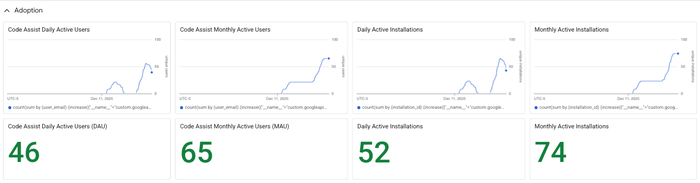
Measure Token Use Where You Can Act on It
Before a request, token counting helps you estimate how much context you are about to send. After the request, usage metadata tells you what was actually consumed.
In production, keep those numbers with the model name, latency, request type, and enough application context to know what the user was trying to do.
A useful dashboard should let you answer questions such as:
- Which feature used them?
- Which model was responsible?
- How much came from input, output, cache, reasoning, or tools?
- Did the request succeed?
- What did that request accomplish for the user?
Model Choice Matters, but Retries Matter Too
Price per million tokens is useful, but it can mislead you if you ignore how many attempts it takes to finish the task.
A cheaper model that needs four retries can cost more than a stronger model that succeeds once. The reverse is also true: using your strongest reasoning model for simple extraction is wasteful.
Use the lightest model that reliably meets the quality bar.
For work that does not need an immediate response, also look at Batch/Flex options instead of assuming every request must use real-time pricing.
When Token Waste Becomes a Bill, Put Guardrails Around It
Once the application has real traffic, token use is no longer only a prompt-design problem. A bad loop, oversized retrieval, or sudden traffic burst can become a cost event.
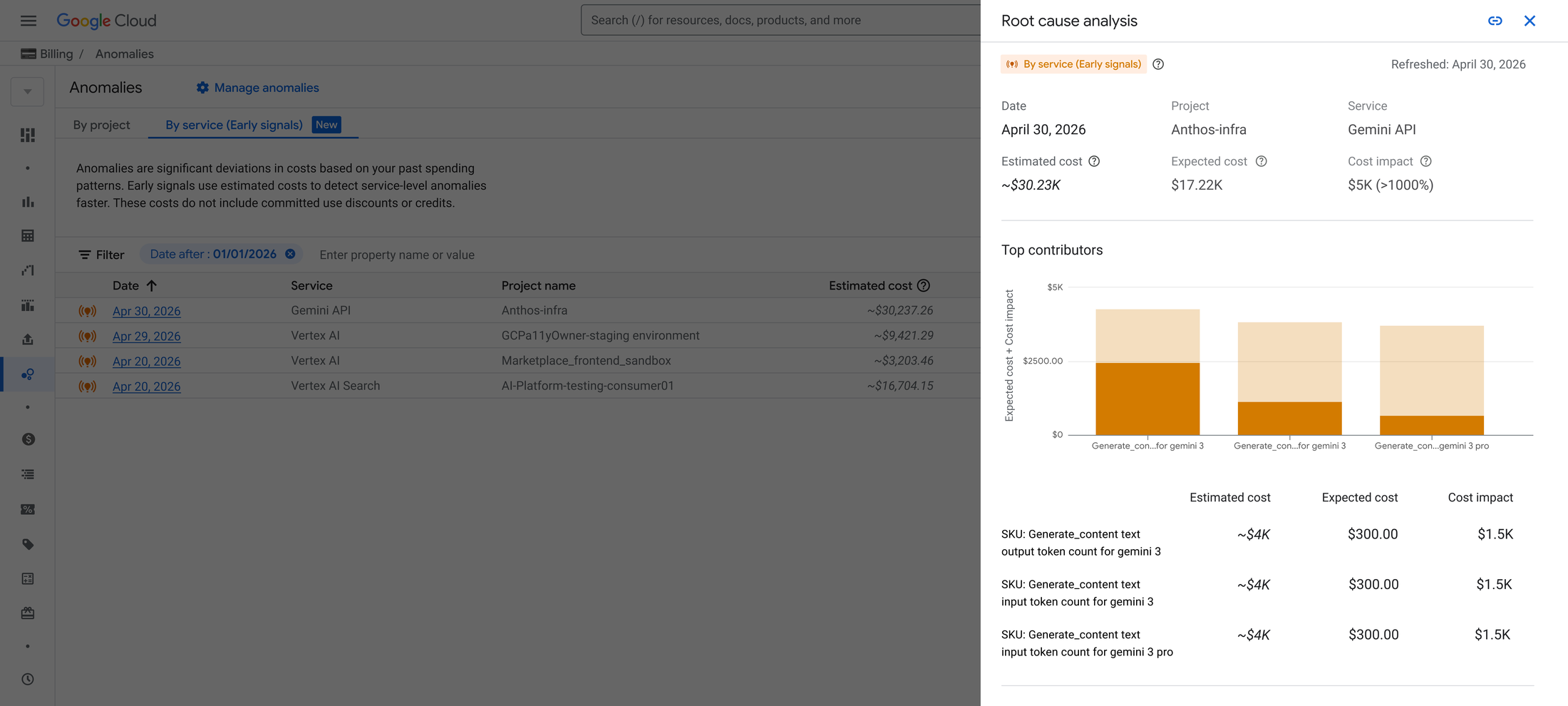
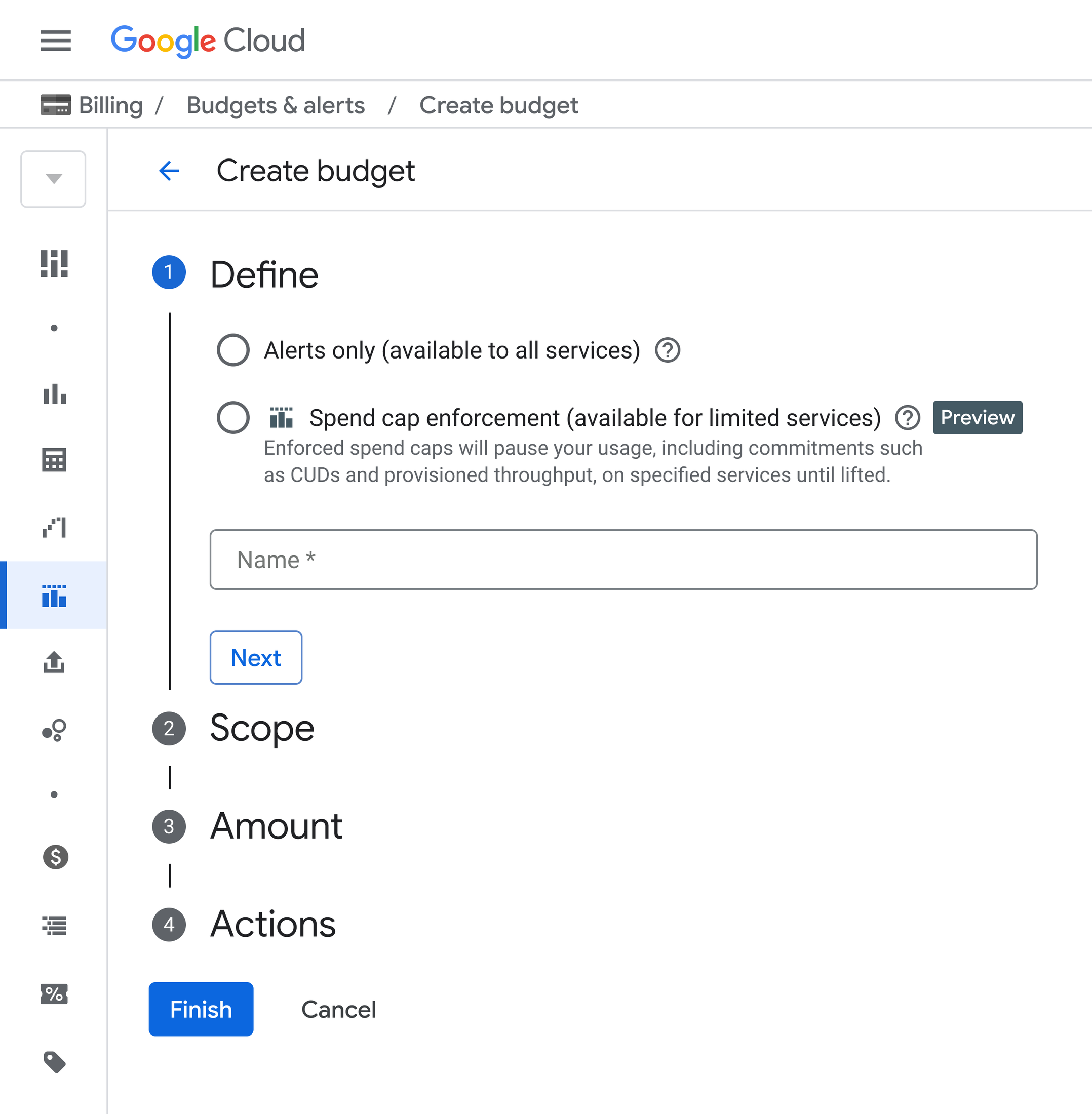
Google Cloud added AI-focused cost controls in 2026. Two are easy to understand: Early Anomalies can flag unusual AI-service spend and highlight the SKUs driving it, while Spend Caps can stop additional on-demand spend for supported services when the cap is reached.
These controls do not replace good application design. Think of them as the seat belt after you have already built the brakes.
If the Gemini Bill Is Higher Than Expected, Check These in This Order
Do not start by randomly shortening prompts. Use the usage data to find which part of the request is growing.
| What you see | Check first | Likely fix |
|---|---|---|
| Input tokens are high | RAG chunks, chat history, system prompt, tool schemas | Retrieve less, summarize history, remove repetition, cache stable context. |
| Output / reasoning is high | Model choice, reasoning level, max output, task complexity | Use a lighter model or reasoning setting where quality still holds; tighten the requested output. |
| Tool-related context is high | Rows, JSON fields, logs, documents returned by tools | Return only the data needed for the next decision. |
| Requests per task are high | Retries, supervisor loops, sub-agent hops | Add stop conditions, max steps, better routing and failure handling. |
| Repeated input is high | Large instructions or reference documents sent again and again | Use context caching when the content is stable and reused enough. |
| Cost is high but token use looks reasonable | Model tier, request mode, grounding and other platform services | Revisit model routing, Batch/Flex and non-token charges. |
An Eight-Point Review Before You Ship
System prompt, history, RAG, tools and media — not only the user message.
Keep token counts with model, latency, request type and success/failure.
Fix retrieval quality before increasing context size.
Do not return 200 rows when Gemini needs five.
Use it when large stable material is reused enough to matter.
Maximum steps, timeouts and stop conditions are cost controls.
Use stronger reasoning only where it improves the result.
A resolved task matters more than a small token count.
A Few Questions That Usually Come Up
Is one token the same as one word?
No. A token is a model-specific unit. A word can be one token or several, and non-text inputs have their own token accounting.
If Gemini supports a huge context window, why not send everything?
Because “fits” and “helps” are different things. Extra context can add cost and latency, and irrelevant material can make the model less focused.
Are output tokens more expensive than input?
For many current Gemini pricing tiers, yes. Check the live Google Cloud pricing page for the exact model you use.
Do reasoning tokens count?
For applicable thinking models, Google documents reasoning/thought tokens as part of usage and pricing.
When should I use context caching?
When a large piece of context stays stable and is reused often. Repeated manuals, code, long instructions, and reference material are common examples.
Why can an agent cost much more than a chatbot?
Because an agent may make several model calls, send tool descriptions, read tool results, keep conversation context, and call other agents before it produces the final answer.
References Used in This Guide
- Google Cloud — Guide to AI Tokenomics
- Google Cloud — Gemini / Agent Platform pricing
- Google Cloud — List and count tokens
- Google Cloud — CountTokens API
- Google Cloud — Usage metadata
- Google Cloud — Long context
- Google Cloud — Vertex AI context caching
- Google Cloud — Gemini thinking
- Google Cloud — Finding the balance between generative AI cost and performance
- Google Cloud — FinOps for AI and agent workloads
- Google Cloud — Gemini CLI Monitoring dashboard and token telemetry
- Google Cloud — Early AI cost anomalies and Spend Caps
Review the Value of the Context You Send
A Gemini request is rarely just what the user typed.
It is the instructions, conversation history, retrieved evidence, tool definitions, tool results, reasoning, answer — and sometimes another trip around the loop.
So when you look at token use, ask one question: did this information help Gemini finish the job?
If yes, the tokens may be worth paying for. If no, that is where I would start cutting.