In this guide — jump to a section
Prepare a Working Agent for Marketplace
This guide is for the point after the demo. Your agent already does something useful, and now you want a customer to discover it through Google Cloud Marketplace and use it in a real environment. You do not need Marketplace experience, but basic familiarity with APIs, Google Cloud projects, and application deployment will help.
Keep one picture in your head: the agent runs in a runtime such as Cloud Run, GKE, or an agent runtime. Marketplace sits around that running product and handles discovery, purchase, entitlement, and billing.
Start with one agent and follow what changes
We will use one example all the way through: Cloud Change Review Agent. A user gives it a proposed Google Cloud change — perhaps a GKE deployment or Terraform plan — and the agent explains the security, reliability, and cost risks before the change reaches production.
On your laptop, that is enough: start the agent, send a request, get an answer. A Marketplace customer needs more. The agent needs a reliable home, a standard way to describe itself, a purchase flow, a way for your backend to know who bought it, and a secure way for approved users to call it.
The key idea: Google Cloud Marketplace does not run your agent. It is the storefront and commercial layer around an agent that is already running somewhere.
Understand Each Marketplace Component
Several services participate in a Marketplace purchase. The following breakdown explains what each component handles so you can map it to your implementation.
Two choices come first: how you sell it and where it runs
This is the first place new publishers often get confused because “deployment” can refer to two different decisions.
Decision 1 — What are customers buying?
| Marketplace product type | Use it when… | Where the software runs | Beginner interpretation |
|---|---|---|---|
| AI Agent as a Service (A2A) | You want an A2A agent that integrates with Gemini Enterprise | Google Cloud | The most agent-native Marketplace path |
| SaaS | Your agent uses a different protocol or is part of a broader SaaS application | Google Cloud or other infrastructure | You sell the agent like a normal hosted software service |
| Kubernetes app | You want the customer to deploy your containerized agent into their GKE/GKE Enterprise environment | Customer-controlled Kubernetes environment | You ship the deployable application rather than hosting it for them |
| Professional Services | You are selling consulting, deployment, customization, or agent implementation services | Depends on the engagement | You are selling expertise/services around agents, not only software access |
This guide follows the AI Agent as a Service using A2A path because that is the Marketplace path in the source designed for agents that integrate with Gemini Enterprise. The other product types are still valid when they match a different business model.
Decision 2 — Where does the hosted agent actually run?
| Runtime | Choose it when… | What you manage | Beginner recommendation |
|---|---|---|---|
| Gemini Enterprise Agent Platform — Agent Runtime | You want a managed runtime designed specifically for agents and supported frameworks such as ADK | Agent logic, tools, permissions, integration | Strong managed-agent option |
| Vertex AI Agent Engine | You want Google-managed agent execution and are comfortable with its supported deployment model | Agent code/configuration; much less infrastructure | Good when you want managed execution rather than containers |
| Cloud Run | Your agent can run as an HTTP/container service | Container, app config, service identity, networking choices | Easiest place for many teams to start |
| GKE | Your agent is part of a larger multi-service platform or needs Kubernetes control | Kubernetes deployments, services, networking, scaling, policies | Use when you genuinely need Kubernetes |
| External infrastructure | You are using the SaaS path or another product model that allows external hosting | The full runtime stack | Do not assume this qualifies for the A2A Agent-as-a-Service path |
A simple way to choose: if the agent already works as an HTTP service, Cloud Run is easy to reason about. If your organization already runs agents on a managed agent runtime, evaluate Agent Runtime or Agent Engine. Use GKE when Kubernetes is a real requirement, not simply because it feels more “enterprise.”
Trace the Purchase and Access Flow
Before touching Producer Portal, look at the end-to-end picture. The customer, Marketplace, your purchase-handling backend, the agent runtime, authentication, and the customer’s Gemini Enterprise environment all have different jobs.
Read the simple flow first. The official architecture below adds the real identity, procurement, registration, and administrative details around the same basic journey.
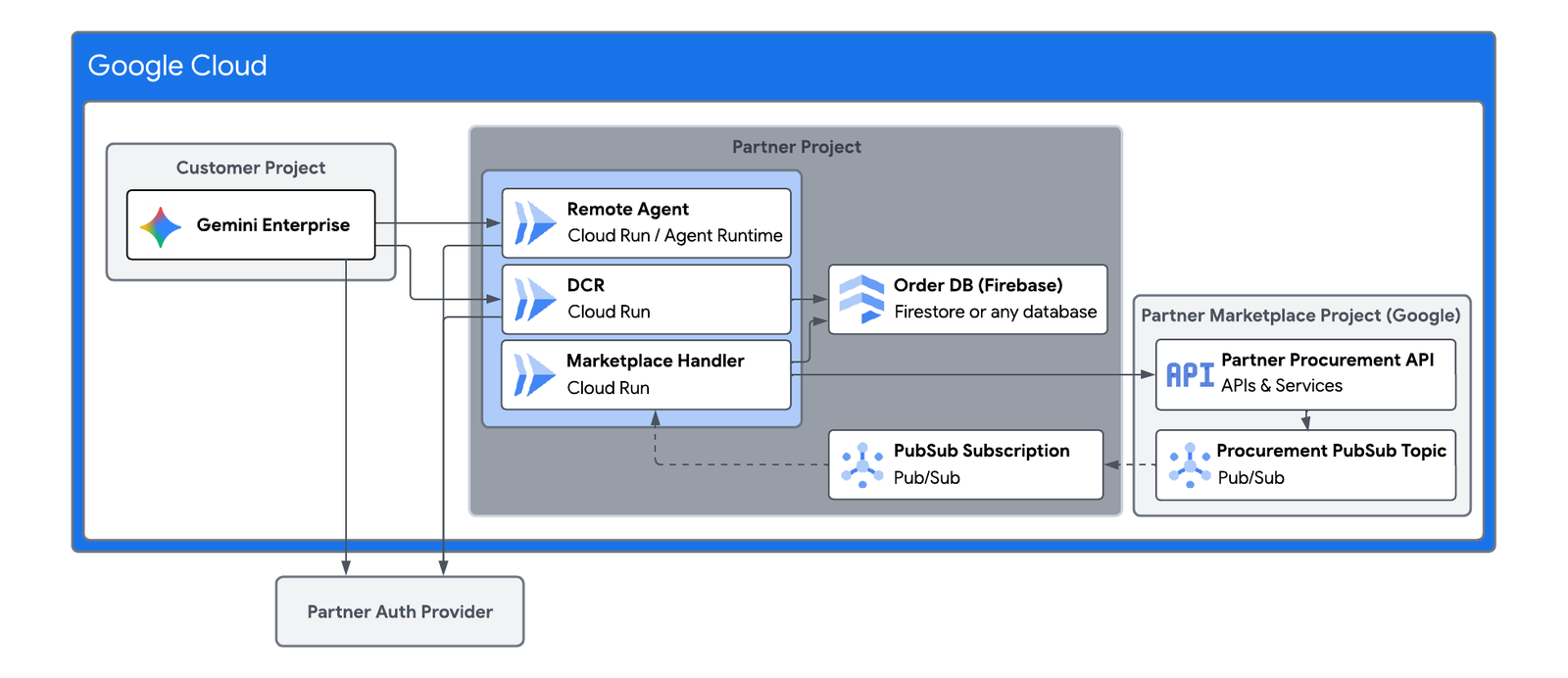
The official diagram may look busy on the first pass. That is fine. For now, keep the simple path in mind: customer buys → Marketplace records the purchase → your backend receives the change → access is provisioned → the customer can use the agent.
Do the engineering and seller setup in parallel
Run two workstreams in parallel: prepare the agent for production, and complete your organization’s Marketplace seller setup.
Start seller onboarding early. Producer Portal access, partner requirements, and Marketplace organization setup do not depend on your final prompt or agent code, so there is little value in waiting until engineering is finished.
Step 1 — Give the agent a stable production home
For our example, we will use Cloud Run because the idea is easy to follow: package the agent, deploy it as a service, and give it a stable HTTPS endpoint.
That fits a request-driven agent well. The source also notes that Cloud Run has different resource types for different execution patterns, so the important point is to choose the runtime shape that matches how your agent actually works.
Official Google Cloud Tech video: How to deploy an AI agent to Cloud Run (step by step). It walks through project setup, ADK, service accounts, deployment, and testing.
What you should have at the end of this step
https://your-agent-service.example.com

or

https://YOUR_CLOUD_RUN_SERVICE_URL
At this stage, the URL is not the Marketplace product. It is simply the reliable address that the rest of the onboarding will point to.
Step 2 — Give the agent a standard way to talk to other agents
Think of A2A as the public conversation contract for your agent. Your internal implementation can use ADK, LangGraph, custom code, or another framework. A2A gives the outside world a consistent way to understand and interact with the agent.
If MCP is also part of your design, that is not a conflict. The two protocols answer different questions:
Official Google for Developers video: How to build an AI agent with MCP, ADK, and A2A on Google Cloud. It shows the relationship between the three technologies and exposes an agent through A2A.
Step 3 — Create the Agent Card: your agent’s machine-readable introduction
If A2A is the conversation protocol, the Agent Card is the introduction that tells a client who this agent is and how to work with it.
- the agent’s name and description;
- the A2A protocol version;
- the endpoint to call;
- which transport it supports;
- which organization provides it;
- what the agent can do;
- which skills it exposes;
- which input/output modes it supports;
- and how authentication should work.
For Marketplace A2A agents, the source requires an Agent Card aligned to the A2A specification. You store that JSON file in Cloud Storage and select it later from Producer Portal.
{
  "name": "Cloud Change Review Agent",
  "protocolVersion": "1.0",
  "description": "Reviews proposed cloud changes and summarizes deployment risk.",
  "url": "https://agent.example.com",
  "preferredTransport": "JSONRPC",
  "provider": {
    "organization": "Example Partner",
    "url": "https://example.com"
  },
  "version": "1.0.0",
  "capabilities": {
    "streaming": false,
    "pushNotifications": false
  },
  "defaultInputModes": ["application/json"],
  "defaultOutputModes": ["application/json"],
  "skills": [
    {
      "id": "review_cloud_change",
      "name": "Review cloud change",
      "description": "Analyzes a proposed cloud change for security, reliability and deployment risk.",
      "tags": ["cloud", "risk", "deployment"],
      "examples": [
        "Review this GKE deployment before production."
      ]
    }
  ]
}
Do not copy the example JSON as your production card. It is intentionally simplified for teaching. Use the current A2A schema and Marketplace validation guidance for the real card, especially for security, models, skills, extensions, and any registration details.
Describe capabilities, not slogans
A vague skill such as “helps with cloud” tells another system almost nothing. A skill such as “reviews a Terraform plan for security, reliability, and cost risks” gives an orchestrator a clear reason to call the agent.
Step 4 — Store the Agent Card where Marketplace can read it
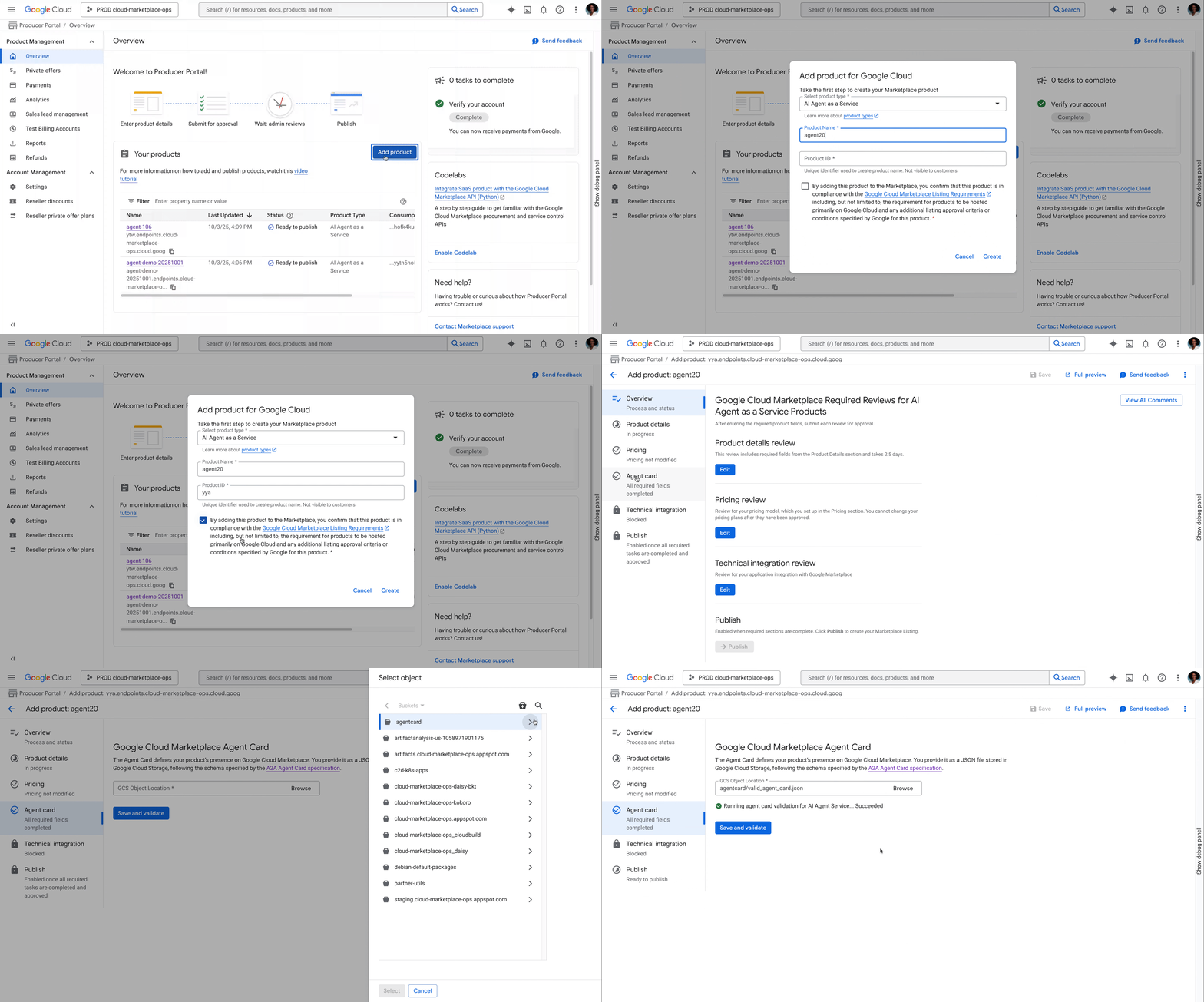
The Marketplace flow in the source expects the Agent Card JSON in a Cloud Storage bucket in the same project used for the Marketplace product.
gcloud storage buckets create gs://YOUR_AGENT_CARD_BUCKET \
  --location=us-central1

gcloud storage cp agent-card.json \
  gs://YOUR_AGENT_CARD_BUCKET/agent-card.json
Keep the source version in version control and treat updates carefully. The Agent Card is part of the product contract that other systems use to understand your agent.
Step 5 — Create the product in Producer Portal
Producer Portal is where the listing, Agent Card, pricing, and technical integration come together. Your organization first needs the required Marketplace vendor onboarding and Project Info Form completed.
Google recommends using a project mainly for Marketplace products. Once you have access, the creation flow is straightforward:
- Open Producer Portal in the Marketplace project.
- Select Add product.
- Choose AI agent as a service.
- Enter the product name.
- Review the generated Product/Solution ID carefully.
- Create the product.
Pause before you click Create. The source says the product type and solution ID cannot be changed afterward. Choose the name and product type as if they are permanent, because for this product they effectively are.
Step 6 — Let Producer Portal check the Agent Card
Inside the product, open the Agent Card section, select the JSON file from Cloud Storage, and choose Save and validate.
Marketplace will point out missing or unclear information. Use that feedback to tighten the card instead of treating validation as a box to tick.
The source specifically calls out details such as skills, competence, models, and security. The clearer those are, the easier it is for both systems and customers to understand what they are dealing with.
Step 7 — Explain the product to the person who might buy it
The Agent Card explains the agent to machines. The Marketplace listing explains it to people.
Your title, icon, description, documentation, support links, categories, industry, and business-function metadata should answer the questions a buyer will actually have:
- What business problem does this agent solve?
- What systems or data does it need?
- What exactly will it do?
- What will it not do?
- How is it secured?
- How is it supported?
- How is it priced?
Avoid phrases such as “AI-powered enterprise automation platform” unless they are followed by something concrete. “Reviews proposed GKE and Terraform changes before production and returns security, reliability, and cost risks” tells the buyer what the product actually does.
Step 8 — Choose a Pricing Model You Can Support
For A2A AI agents, the source documents four core pricing choices.
| Model | Customer experience | What it means for engineering |
|---|---|---|
| Free | No software charge for the agent | Simplest commercial model; customer still pays for applicable Google Cloud resources |
| Subscription | Flat recurring charge | You need subscription/entitlement lifecycle handling |
| Usage-based | Customer pays according to one or more defined metrics | You must measure and report usage to Google |
| Combined | Base subscription plus usage charges | You need both entitlement handling and usage metering |
Pricing review can take up to four business days, so it makes sense to submit pricing while the technical integration work continues.
What can “usage” mean for an agent?
Usage does not have to mean model tokens. It can be a business event that customers understand:
- reports generated;
- tickets resolved;
- documents processed;
- deployments reviewed;
- anomalies detected;
- workflows completed.
Whatever you charge for must also be something your backend can count consistently. If the product is priced “per deployment review,” engineering needs one unambiguous definition of what counts as a deployment review.
Step 9 — Make your backend react when the customer buys
Your backend must respond to the purchase by provisioning the access included in the customer’s plan.
Pub/Sub tells your backend that something changed
Your Partner Engineer creates the Pub/Sub topic used for Marketplace lifecycle events. Your backend subscribes so it knows when a customer purchases, changes, or cancels the product.
Partner Procurement API tells you what the customer is entitled to
The Partner Procurement API connects your own customer record to the Marketplace purchase. The source notes that access to this API is enabled through your Partner Engineer rather than simply switched on in the console.
Usage pricing adds one more responsibility: metering
If pricing depends on usage, a trusted part of your system also has to count the agreed metric and report it through the required billing integration.
Build for duplicate events. Pub/Sub messages can arrive more than once. Handling the same purchase event twice should not create two customer accounts, grant duplicate access, or report usage twice.
Step 10 — Payment and identity are two different checks
A customer can have a valid subscription and still send an unauthenticated request. Those are two separate questions.
For Gemini Enterprise integration, the source discusses public access or OAuth 2.0 Authorization Code Grant. For a typical enterprise product, you should expect to design real authentication rather than simply leave the agent anonymously reachable.
If you use Dynamic Client Registration, the Agent Card can advertise the registration information needed for Gemini Enterprise to establish the OAuth client relationship.
Never put secrets in the Agent Card. The card can describe how authentication works, but passwords, client secrets, tokens, and private keys do not belong there.
Step 11 — Test the purchase journey, not only the agent
Your agent endpoint can be perfectly healthy while the Marketplace product is still broken. The real test starts before purchase and ends only after access, plan changes, cancellation, authentication, and troubleshooting all behave correctly.
Step 12 — Complete the reviews, then publish
Producer Portal separates the product into several review areas. According to the source, you need:
- Product details review;
- Pricing review;
- Technical integration review;
- Agent Card validation.
Product details and pricing can be submitted in either order, but pricing must finish review before the technical integration review is submitted.
Once the required reviews are successful, the agent goes through Marketplace validation and testing. After validation, Google provides the process or command used to make the listing public.
Your service launch and Marketplace launch are not the same date. The agent may be running in Cloud Run for days or weeks before customers can see the product publicly in Marketplace.
What the customer sees after the purchase
Once the listing is public, an enterprise buyer can discover and procure the agent through Google Cloud Marketplace. In the A2A + Gemini Enterprise flow described in the source, an administrator can then add or configure that procured agent in the customer’s Gemini Enterprise environment.
That separation is useful: the person responsible for purchasing does not have to be the same person who decides which employees are allowed to use the agent.
Google provides the marketplace. You still own the product.
| Area | Google / Marketplace | You, the agent publisher |
|---|---|---|
| Marketplace listing | Marketplace platform, purchase experience, billing integration | Product content, commercial model, support information |
| Agent runtime | Depends on the runtime you choose | Agent code, configuration, release, availability responsibilities appropriate to that runtime |
| Agent Card | Validation and ingestion | Accuracy, completeness, versioning |
| Customer entitlement | Marketplace creates and communicates purchase state | Your backend provisions/revokes access accordingly |
| Usage pricing | Billing platform | Correctly measure and report the agreed usage metric |
| Agent behavior | Platform/model services you choose | Your prompts, tools, policies, safety controls, quality, observability, support |
Where Agent Registry fits — and where it does not
You may also use Agent Registry, but it solves a different problem from Marketplace.
Agent Registry is about discovering and governing agents in the Google Cloud agent ecosystem and within an organization. The source notes that supported runtimes can register agents automatically, while external or cross-project agents can be registered manually. A2A information such as the Agent Card and skills can help describe them.
Google Cloud Marketplace is about distributing and selling the agent to customers.
Agent Registry
  → discovery and governance

Google Cloud Marketplace
  → commercial listing, procurement, entitlement, billing

Gemini Enterprise Agent Gallery
→ governed end-user discovery and useSeven mistakes that turn onboarding into rework
1. Opening Producer Portal before the agent contract is stable
If the endpoint, authentication model, or public capability keeps changing, the Agent Card and integration keep changing too. Stabilize the external contract first.
2. Mixing up product type and runtime
Cloud Run and GKE tell you where software runs. A2A Agent-as-a-Service, SaaS, Kubernetes app, and Professional Services tell you how the customer buys what you offer.
3. Writing the Agent Card like marketing copy
The Agent Card is integration metadata. Keep it precise, technical, and honest about what the agent can actually do.
4. Describing skills so vaguely that nobody knows when to call them
A skill is useful only if another system can look at it and know when your agent is the right agent to call.
5. Choosing usage pricing before defining the meter
A pricing metric has to be countable, repeatable, and auditable before you build billing around it.
6. Treating Marketplace events like optional webhooks
Purchase and cancellation events affect access and revenue. Use idempotency, persistence, retries, and monitoring.
7. Treating entitlement and authentication as the same thing
A caller can be authenticated while the customer’s subscription is inactive. A customer can also be entitled while a particular request is not authenticated. Check both.
For a first Marketplace agent, this is the order I would use
- Define exactly what the agent does and who buys it.
- Choose the Marketplace product type.
- Choose the runtime.
- Deploy one stable production endpoint.
- Add and test A2A for the Agent-as-a-Service path.
- Create and version the Agent Card.
- Start Marketplace vendor onboarding in parallel.
- Create the product and validate the Agent Card in Producer Portal.
- Write the human-facing listing and submit pricing early.
- Implement Pub/Sub and Partner Procurement API integration.
- Add usage reporting only if the pricing model requires it.
- Implement and test authentication, OAuth, and DCR where required.
- Run an end-to-end purchase, upgrade, cancellation, and access test.
- Complete product, pricing, technical, and Agent Card reviews.
- Pass Google validation and publish.
- Test the real customer-side Gemini Enterprise journey.
One last check before you call it ready
Keep the official Google Cloud docs beside you while you build
Maintain the Product After Publication
Marketplace onboarding adds the purchasing, access, support, and operational processes a customer needs to use your agent.
The moment you sell the agent, questions that were optional during the prototype become part of the product: Where does it run? How is it described? Who bought it? Who is calling it? What happens when the plan changes? How is usage counted? Can you trace a failed request?
The process becomes much easier once those concerns are separated instead of treated as one giant “Marketplace integration.”
Build → Deploy → A2A → Agent Card → Marketplace → Entitlement → Auth → Validate → PublishThat is the real path from “my agent works on my laptop” to “a customer can discover it, buy it, get access, and use it with confidence.”