Reference Architecture for Enterprise Workloads on Google Cloud
A practical walkthrough of one Google Cloud application architecture — starting with the business requirements, then choosing compute, data, networking, identity, delivery, monitoring, availability, recovery, and cost one decision at a time.
Most bad cloud architectures do not look bad. They look impressive. The diagram has plenty of boxes, every box is a real Google Cloud service, and every choice can be defended on its own.
The trouble starts when the products were chosen before the requirements. In this article, we will do the opposite. We will design one mid-size commerce application from the requirements outward, adding a service only when the application gives us a reason to add it.
Define the Application Requirements
Drawing boxes is easy. The hard part is deciding which boxes you can leave out.
Cloud Run, GKE, and Compute Engine can all run applications. Cloud SQL, AlloyDB, and Spanner can all store relational data in different ways. Knowing the product names is useful, but architecture is really about matching a requirement to the simplest service that solves it.
The following design starts with a small set of services and identifies the requirements that would justify adding more.
Meet the Application We’re Designing
To keep the discussion real, we will design one fictional system: an Enterprise Commerce Application.
Customers use it from the web and mobile. They browse products, sign in, place orders, and pay through an external payment provider. The application stores orders, inventory, and customer data, serves product images and documents, and runs a few background jobs such as confirmation emails and analytics feeds.
It is deliberately ordinary. Most enterprise applications look more like this than a hyperscale social network, which makes it a useful example for everyday architecture decisions.
Before we name a single Google Cloud service, write down what the application actually needs:
- Public HTTPS application, reachable globally
- Stateless application tier that can scale up and down with demand
- A relational transactional database — orders and payments need consistency, not eventual consistency
- Production-grade high availability within a region
- Private connectivity between the application and the database — no public database endpoint
- Workload identity instead of long-lived credentials
- Automated, repeatable deployments
- Central logging and monitoring from day one
- Moderate initial scale, with a clear path to grow
- A defined Recovery Time Objective (RTO) and Recovery Point Objective (RPO)
Everything that follows should answer one of these requirements. If a service cannot be tied back to a requirement, it probably does not belong in the first version.
Give the Workload a Clean Home First
Before the application lands anywhere, give it a clean place to live. Google Cloud organizes resources as Organization → Folders → Projects. For a real production setup, development, staging, and production are usually easier to manage as separate projects than as three piles of resources inside one project.
Why does that matter? Projects give you useful boundaries for IAM, quotas, billing, and networking. A noisy test environment should not be able to consume production quota or accidentally share broad permissions with production.
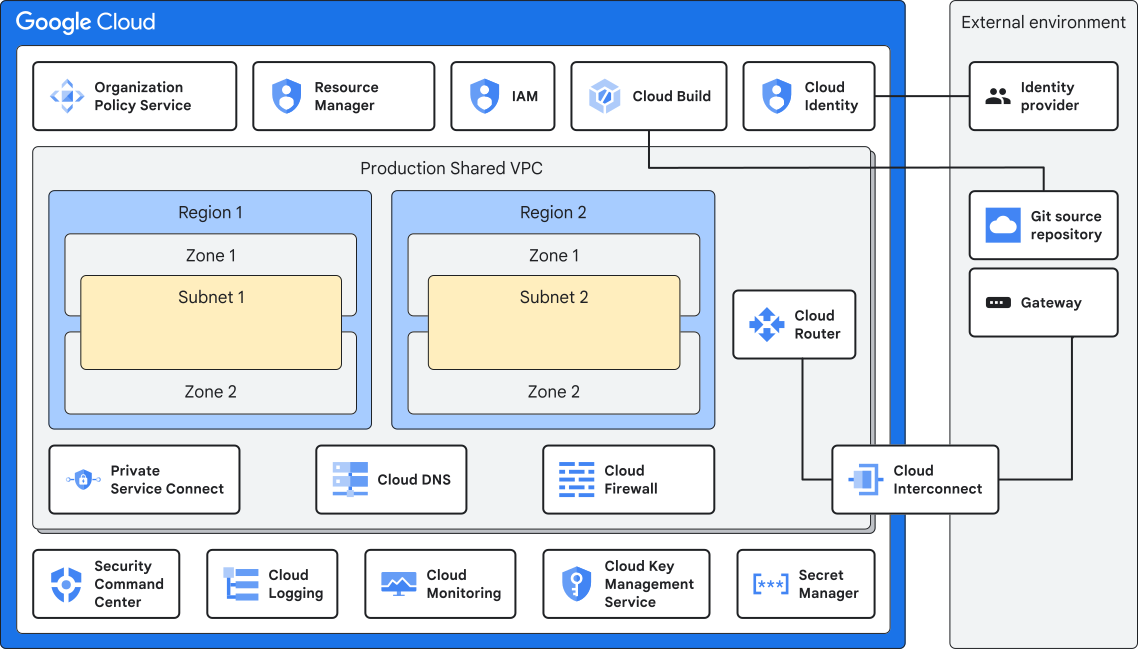
Once several teams need shared networking, Shared VPC becomes useful. A central host project owns the VPC, subnets, and firewall policy, while application projects use those networks without owning the network itself. You do not need this for every small application, but it becomes valuable when network ownership needs to be centralized.
This article is not trying to build a complete landing zone. The practical point is simpler: settle the project structure and network ownership model before the application arrives, not after people are already depending on it.
The Baseline Architecture
Here is the baseline we will build toward for the commerce application.
The interesting part is what is missing: no Kubernetes cluster, no service mesh, no three-database strategy, and no customer-managed encryption keys. That is intentional. A stateless application behind a managed edge, talking to one relational database, is enough for many real workloads.
Around the main request path sit the things that keep the system usable in production: IAM, service identity, Secret Manager, Terraform, build and deployment tooling, logs, metrics, traces, security monitoring, high availability, backups, and eventually disaster recovery. They matter, but they do not all need to clutter the traffic diagram.
Follow One Request from the Browser to the Database
Before comparing more products, follow one normal request. A customer opens a product page. What happens between the browser and the database?
Google-managed services already give you a useful amount of logging, metrics, and tracing along this path. The edge can log requests and security events, Cloud Run integrates with Cloud Logging and Monitoring, and Cloud SQL exposes database metrics and logs. When you need deeper detail — such as time spent inside a SQL call or payment API — add application instrumentation and trace context.
Then ask one question at every hop: what happens if this part fails? A bad Cloud Armor rule can block valid users. Cloud Run handles instance failures for you, but the application still needs sensible retry behavior. Cloud SQL can fail over when regional HA is configured, but your code still has to reconnect cleanly. Managed services reduce work; they do not remove the need to think through failure.
Why Cloud Run Fits This Workload
Cloud Run is the compute choice in this design, but not because Cloud Run is automatically the best answer for every application.
This API is stateless. A request does not need a particular server to remember anything after it finishes; durable state lives in the database. That is a good fit for Cloud Run: run the container, scale with demand, and let Google handle the underlying servers. The load balancer and Certificate Manager own the public edge, while Cloud Run focuses on running the application.
Compare these requirements when choosing a runtime:
| Runtime | Best fit | Trade-off |
|---|---|---|
| Cloud Run | Stateless APIs, web apps, event-driven handlers | No Kubernetes API or cluster-level control |
| GKE Autopilot | Teams that genuinely need Kubernetes APIs, ecosystem tooling, or Kubernetes-native platform patterns | Kubernetes concepts still matter even though Google manages most node infrastructure |
| GKE Standard | Kubernetes workloads that also need deeper control of nodes, infrastructure, or specialized configuration | Greater platform control comes with greater operational responsibility |
| Compute Engine | Legacy or COTS software, custom operating systems, workloads that genuinely need VM-level access | You own more of the patching, scaling, and VM lifecycle |
Cloud Run is not “better than GKE.” It is simply a better fit when the workload does not need Kubernetes. If a team genuinely needs Kubernetes APIs, controllers, platform tooling, or deeper cluster control, GKE can be the right answer from day one.
For this commerce application, there is no Kubernetes-specific requirement. So Cloud Run is the simpler starting point. Revisit that decision when a real requirement appears — not because Kubernetes sounds more enterprise-ready.
Start With the Simplest Database That Fits
Cloud SQL is the starting database here. Orders, customers, inventory, and payments fit a conventional relational model, and Cloud SQL gives us managed PostgreSQL or MySQL, backups, replicas, and regional HA without asking the team to operate a database cluster.
Use a different database when the workload gives you a clear reason:
- AlloyDB — consider it when PostgreSQL performance is a measured problem, or when you need demanding transactional plus analytical workloads. Do not treat it as an automatic upgrade from Cloud SQL.
- Cloud Spanner — consider it when strongly consistent relational transactions really must scale across regions. Most single-region applications do not need that on day one.
- Firestore — a better fit for document-style data, real-time listeners, or mobile-first patterns than for a classic orders-and-payments relational model.
- Bigtable — built for very large, low-latency key-value or wide-column workloads such as telemetry or clickstream data, not normal commerce transactions.
- BigQuery — use it for analytics and reporting once historical business data should be queried separately from the operational database.
Avoid choosing from benchmark headlines alone. Real performance depends on instance size, workload shape, configuration, and query patterns. Measure the application you actually have, then move when Cloud SQL no longer meets the requirement.
Choose the Required Private Connections
This is where Google Cloud terminology can become harder than the actual design. Several names sound similar, but they solve different problems:
- Private Google Access (PGA) — lets resources with only internal IP addresses reach Google APIs such as Cloud Storage or Pub/Sub without giving those resources a public IP.
- Private Service Connect (PSC) — gives consumers a private endpoint for a service. For Cloud SQL, it is useful when multiple VPCs, projects, teams, or organizations need private access to the same database service.
- Private Services Access (PSA) — creates a private connection between your VPC and a Google-managed producer network. Cloud SQL can support PSA, PSC, or both depending on the design.
- VPC Network Peering — connects two VPCs at Layer 3. Peering is not transitive, so A→B and B→C does not automatically create A→C.
- VPC Service Controls (VPC SC) — not a network route. It creates a security perimeter around supported services to reduce data-exfiltration risk. Think of it as an extra policy boundary on top of networking, not another path to the database.
For Cloud Run, the source architecture starts with Direct VPC egress when the service needs VPC access. Serverless VPC Access is still available and can fit some designs, but the important thing is to choose based on the connection you need rather than habit.
Your Application Needs an Identity Too
People are not the only things that need an identity. Applications, workloads, and CI/CD systems need one too — and giving all of them broad permissions is how small shortcuts turn into security problems.
- Human users — authenticate as people or groups through IAM, ideally connected to the organization’s existing identity provider.
- Cloud Run — runs with a service account. Give that identity only the permissions the application actually needs, such as reading one secret or writing to one bucket.
- GKE workloads — use Workload Identity Federation for GKE so pods can access Google Cloud without downloaded service-account keys in the cluster.
- External CI/CD — GitHub Actions, GitLab, and similar systems can use Workload Identity Federation to exchange short-lived identity tokens instead of storing a service-account key as a secret.
The shared lesson is simple: avoid long-lived downloaded service-account keys wherever you can. Short-lived federation and platform-managed identities reduce the chance that a credential sits forgotten in a repository, pipeline, or log.
Keep Secrets Out of the Application
Secret Manager is where runtime secrets belong: database credentials, payment-provider keys, third-party tokens, and similar values that should never be baked into a container image or committed to source control. The application reads them using its own identity and IAM permissions.
For encryption at rest, Google Cloud already encrypts customer data by default with Google-managed keys. For many workloads, that is the sensible baseline.
Customer-Managed Encryption Keys (CMEK) add control over the key lifecycle. That can be important when a regulatory, contractual, or sovereignty requirement specifically asks for it. It also adds responsibility and another failure mode. Use CMEK because a requirement needs customer-controlled keys, not because the word “enterprise” appears in the project name.
When Work Should Happen in the Background
A checkout request should do only the work the customer must wait for. Confirmation emails, fulfillment triggers, and analytics updates can often happen after the order has already been accepted.
Order created
  → Pub/Sub topic: "order.created"
  → Subscriber: send confirmation email
  → Subscriber: trigger fulfillment
  → Subscriber: feed analytics pipeline
Pub/Sub lets the checkout service publish one event and move on. Downstream subscribers can handle email, fulfillment, or analytics independently. If one subscriber is temporarily unavailable, it does not have to keep the customer waiting at checkout.
Pub/Sub and Eventarc are related but not interchangeable. Pub/Sub is general-purpose messaging your application publishes to. Eventarc routes platform events — for example, something happening in Cloud Storage or Cloud Audit Logs — to a destination such as Cloud Run.
Do not add either just because asynchronous architecture looks modern. If there is no real background or event-driven requirement, keep the first version synchronous and simpler.
From Code Commit to Production
Infrastructure, building, and releasing are related, but they are not the same job. Keeping them separate makes the pipeline much easier to reason about.
Infrastructure as Code. Terraform describes the VPC, IAM bindings, Cloud SQL instance, Cloud Run service, and other infrastructure in code instead of relying on somebody clicking through the console.
Continuous Integration. A commit triggers Cloud Build to run tests and checks, build the container image, and push that image to Artifact Registry. Supported artifacts can then be scanned when the relevant scanning capability is enabled.
Continuous Delivery. Cloud Deploy promotes the same immutable image through Dev → Staging → Production. Do not rebuild a slightly different image for each environment. The value is knowing that the exact artifact tested in staging is the one promoted to production.
Supply-chain controls such as provenance, Binary Authorization, and SBOMs can be added when the organization needs them. They are useful controls, but they do not need to make the first working delivery pipeline unreadable.
Know What Is Happening Before Something Breaks
You do not want your first useful monitoring question to happen during an outage. Start with three simple signals:
- Logs — the detailed record of what happened.
- Metrics — the numbers that show how the system is behaving over time.
- Traces — the path one request took and where it spent its time.
Managed Google Cloud services give you a good starting point, but they cannot see everything inside your code. Cloud Run can provide request traces, while deeper timing — database calls, payment-provider latency, or internal service hops — needs application instrumentation and trace-context propagation.
Then connect those signals to what users care about. An SLI is a measurement such as checkout latency or error rate. An SLO is the target, such as 99.5% of checkout requests finishing within a chosen time. The error budget is the amount of unreliability you have agreed to tolerate.
For a new application, two or three good SLOs are more useful than twenty dashboards nobody checks. Start with the things customers actually notice: can they check out, how long does it take, and how often does it fail?
High Availability Is Not Disaster Recovery
These two terms are often mixed together, but they solve different problems. High availability is about staying up through expected infrastructure failures such as an instance or zone problem. Disaster recovery is about recovering from a much larger event such as a regional outage, bad deployment, human error, or ransomware.
Expected infrastructure failure
Automatic redundancy and failover within a region, with applications designed to retry connections sensibly.
Business continuity after a larger event
Driven by explicit RTO and RPO. Pilot light or warm standby often makes more sense than active-active.
For this commerce application, the starting point is regional HA for the always-on system, plus backups and point-in-time recovery underneath it. Add cross-region DR only after the business has written down an RTO and RPO that regional HA and backups cannot meet.
And one rule deserves to be blunt: a backup you have never restored is not a recovery plan. Run restore drills. The point is not to prove that a backup job says “successful”; it is to prove that the team can recover the application in the time the business expects.
Estimate the Cost of Each Component
Every box on an architecture diagram eventually becomes a line on a bill. Serverless is not automatically the cheapest option; its main advantage here is that it removes infrastructure work.
A few cost decisions are worth making consciously from the beginning:
- Cloud Run minimum instances — keeping instances warm reduces cold starts, but you pay for that idle capacity.
- Autoscaling ceilings — a maximum instance count can protect both the bill and the database from runaway scaling.
- Cloud SQL sizing and edition — size from measured demand, not generous guesses “just in case.”
- Logging volume and retention — debug logs left on for months can become a recurring cost.
- Egress and caching — Cloud CDN can help latency and egress cost when the content actually has useful cache-hit potential.
- Idle Kubernetes capacity — if GKE enters the design later, unused capacity is easy to pay for without noticing.
- Committed use discounts — revisit them once baseline usage is predictable rather than guessing at launch.
This is not an argument against GKE, AlloyDB, Spanner, or any other service. It is an argument for knowing what you are paying for and which requirement justified the choice.
Know What Should Trigger the Next Upgrade
A good baseline is useful only if you also know when to leave it. The table below shows the kind of requirement that should trigger a move to a more specialized design.
| Trigger | Move to | What you’re taking on |
|---|---|---|
| Genuine Kubernetes requirement — Kubernetes-native APIs, controllers, or platform tooling | GKE Autopilot | Kubernetes concepts and platform governance |
| Deeper node or cluster infrastructure control is required | GKE Standard | More infrastructure responsibility |
| Cloud SQL is a measured bottleneck, or demanding PostgreSQL/HTAP requirements emerge | AlloyDB | Higher baseline cost and a more specialized database architecture |
| Transactional relational scale must span regions | Spanner | Different cost profile and data-model/design considerations |
| A regulatory, contractual, or sovereignty requirement mandates customer-controlled key lifecycle | CMEK | Key-management operational responsibility and key-availability risk |
| Sensitive managed-service data requires a service perimeter beyond IAM | VPC Service Controls | Perimeter design, testing, and operational complexity |
| A documented RTO/RPO cannot be met by regional HA plus backup/recovery | Cross-region DR | Standby capacity, replication, failover testing, and additional cost |
The pattern is consistent: a specific requirement earns a specific piece of complexity. GKE, AlloyDB, Spanner, CMEK, VPC Service Controls, and cross-region DR are not bad choices. They are simply bad defaults when the workload has not asked for them.
Use the Well-Architected Framework as a Final Check
Once the baseline makes sense, use Google Cloud’s Well-Architected Framework as a wider check. The source article maps the design across six pillars: Operational Excellence, Security/Privacy/Compliance, Reliability, Cost Optimization, Performance Optimization, and Sustainability.
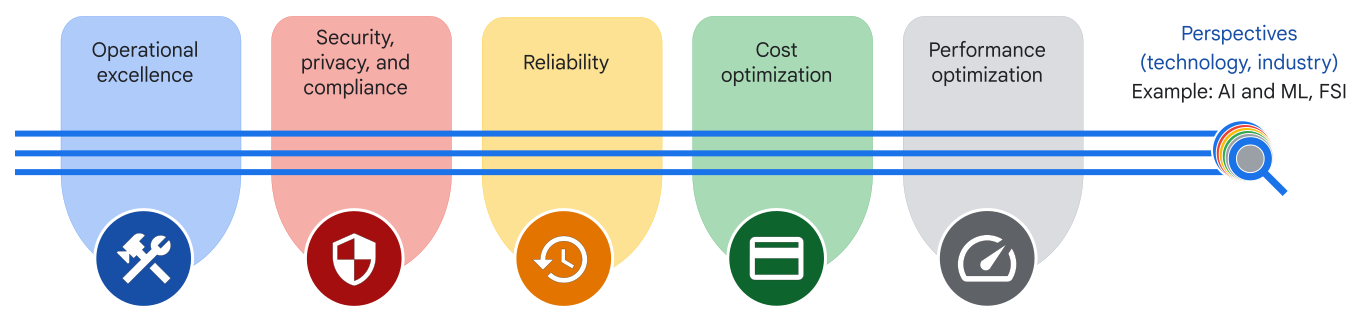
You can see those ideas throughout this design already. HA and DR support reliability. IAM, workload identity, Cloud Armor, and encryption support security. Compute and database choices affect performance. Delivery and observability support operations. Cost controls stop the architecture from quietly growing more expensive. Sustainability adds another practical question: are we running more infrastructure or retaining more data than the workload actually needs?
Red Flags I Would Question in a Review
These are the kinds of choices I would immediately ask someone to explain in a design review:
- Kubernetes adopted without an actual Kubernetes requirement
- IAM roles granted at the project level when a narrower role would do
- A downloaded service-account JSON key sitting in a CI pipeline
- A database with a public IP address, “temporarily,” for six months
- Memorystore running without anyone able to explain what it’s caching or why
- CMEK enabled without a named business or regulatory requirement driving it
- Active-active multi-region DR for a workload with no documented RTO/RPO
- Backups that have never once been restored
- Dashboards full of metrics with no SLOs attached to any of them
- The same artifact rebuilt separately for dev, staging, and production instead of promoted
None of them automatically means the architecture is wrong. The problem is when nobody can explain the requirement, owner, or trade-off behind the decision. That is how a simple system slowly turns into one the team is afraid to change.
Before You Call the Architecture Ready
- Write the requirements before choosing service names.
- Separate environments and confirm the organization, folder, and project structure.
- Use Shared VPC only when centralized network ownership across teams or projects is actually needed.
- Start with Cloud Run for this workload, or document why another runtime fits better.
- Evaluate Direct VPC egress first for Cloud Run VPC access; use Serverless VPC Access where its characteristics are the better fit.
- Start with Cloud SQL for this relational workload, and document the requirement before choosing a more specialized database.
- Use PGA, PSC, PSA, and VPC Service Controls for the different problems they are designed to solve.
- Use workload identity and avoid long-lived service-account keys in CI.
- Keep secrets in Secret Manager; use CMEK only when a named requirement calls for customer-managed keys.
- Add Pub/Sub or Eventarc only when there is a real asynchronous or event-driven need.
- Keep Terraform, CI, and CD as distinct stages and promote one immutable artifact through environments.
- Collect logs, metrics, and traces, then define a small number of SLOs tied to user experience.
- Enable regional HA where required and prove backups with real restore tests.
- Write down RTO and RPO before designing cross-region DR.
- Make cost choices such as minimum instances, autoscaling limits, and log retention deliberately.
Official Google Cloud References
Foundation
Enterprise Foundations Blueprint
Organization, networking, governance and security foundations.
Compute
Cloud Run
Current product capabilities and the official Cloud Run introduction.
Networking
Cloud Run VPC Connectivity
Direct VPC egress and Serverless VPC Access guidance.
Networking
Private Service Connect
Service-oriented private connectivity patterns.
Messaging
Pub/Sub
Asynchronous messaging, publishers, subscribers and official learning material.
Resilience
Backup and DR
Backup vaults, recovery patterns and official DR guidance.
Framework
Well-Architected Framework
Current six pillars and architecture design principles.
Sustainability
Sustainability Pillar
Energy-efficient and carbon-aware architecture guidance.
Frequently Asked Questions
Is Cloud Run always a better choice than GKE?
No. Cloud Run is the baseline in this article because the example workload is stateless and doesn’t require Kubernetes APIs. If Kubernetes-native tooling, controllers, platform policies or deeper cluster capabilities are requirements, GKE becomes a better fit.
Should every enterprise workload use Shared VPC?
No. Shared VPC is valuable when networking is centrally managed across multiple service projects or teams. A smaller workload can be perfectly valid with a project-local VPC.
Should AlloyDB replace Cloud SQL for production applications?
Not automatically. Cloud SQL is a strong baseline for conventional relational workloads. AlloyDB is more compelling when measured PostgreSQL performance, high concurrency or HTAP requirements justify the extra specialization and cost.
Do I need CMEK for an enterprise workload?
Only when a regulatory, contractual or risk-control requirement calls for customer-managed key lifecycle. Google Cloud encrypts customer data at rest by default; CMEK adds control and operational responsibility.
What is the difference between high availability and disaster recovery?
High availability reduces disruption from expected infrastructure failures, such as an instance or zone becoming unavailable. Disaster recovery addresses a larger failure scope and is designed around business-defined RTO and RPO.
Expand the Architecture When Requirements Change
This design provides a starting point for the application described in the guide. Revisit the runtime, database, encryption, and regional design when requirements change. Record the reason for each addition and the operational work it introduces.