1. What Changes When an Agent Enters Production
Getting an AI agent to work once is surprisingly easy. Getting the same agent to behave safely, predictably, and explainably for real users is a different engineering problem.
A demo can be as simple as a model, a prompt, and one tool. You ask a question, the model calls the tool, and the answer looks impressive.
Production adds the questions the demo lets you ignore. Who can use the agent? What data can it see? What if it chooses the wrong tool? What if a tool returns hostile text? How do you test the agent after a model or prompt change? And how do you investigate a bad answer later?
Those are not mainly model questions. They are system-design questions: identity, permissions, tool boundaries, evaluation, observability, and failure handling.
So we will learn this in the same order a team should build it. First, make one ADK-to-MCP tool call work locally. Then replace the toy tool with real FinOps data. Finally, add the controls that make the same pattern suitable for production.
Our running example is intentionally narrow: a read-only Google Cloud FinOps agent that answers one useful question: “Why did our Google Cloud costs increase this month?”
Gemini selects actions and generates responses, ADK manages the agent workflow, MCP connects tools, and Google Cloud access controls restrict what the application can do.
Keep one rule in mind as you read the rest of the article:
The model may decide what it wants to do. Deterministic code must decide what it is allowed to do. ADK runs the agent. Gemini reasons. MCP carries tool calls. IAM, validation, security, evaluation, observability, and governance remain outside the model.
FinOps is a good example because the data matters, but the first version can stay read-only. That lets us learn production controls without giving the model a path to change infrastructure or financial settings.
- A tiny local MCP server with one typed tool.
- An ADK agent that discovers and calls that tool.
- The same pattern moved from local stdio to remote Streamable HTTP.
- A read-only FinOps agent backed by BigQuery, IAM, evaluation, and observability.
Four jobs. Keep them separate.
If you know which layer owns which job, the rest of the architecture becomes much easier.
The boundary that matters: Gemini can propose a tool call. Code and policy still decide whether that call is valid and permitted.
2. Stages of Building and Operating the Agent
Think of production readiness as a series of upgrades. Each stage answers a question that the previous stage could ignore.
Prototype. Can a model understand the task at all? Start with a prompt and no production assumptions.
Tool-enabled. Can the model use a function when it needs outside information?
Connected. Can those tools live behind a standard interface such as MCP instead of being hard-wired into the agent process?
Evaluated. Can you prove the agent chooses the right tool, uses the right arguments, and produces an answer grounded in the returned data?
Secured. Can the agent access only what it needs, with validation and authorization enforced outside the model?
Observable. If an answer is wrong tomorrow, can you trace the request through the model, tool, data source, and policy decision?
Production. Can you deploy, roll back, monitor, and operate the whole system without improvising?
Our FinOps example moves through these stages in order. The first half teaches the mechanics. The second half adds the controls that make the mechanics trustworthy.
3. Google ADK: The Agent Application Layer

The Agent Development Kit (ADK) is Google’s code-first framework for building, evaluating, and deploying agents. In this article, its job is simple: give the agent a proper application structure instead of making us hand-build the model loop, tool registry, session handling, and orchestration.
A useful way to picture ADK is as the application layer around Gemini.
ADK is not your enterprise security perimeter. Identity, network controls, data governance, and authorization still belong in the surrounding Google Cloud architecture.
You only need a few ADK concepts to follow this article:
Agents. Use an LlmAgent where the model genuinely needs judgment. Use workflow agents where the sequence is already known. For FinOps, the model can choose how to explain a cost change, while deterministic workflow steps are better for fixed retrieval or correlation sequences.
Instructions. These define the agent’s role and behavior. They guide the model, but they are not access control. Real boundaries must be enforced below the prompt.
Tools. These are the capabilities the agent can call. They may be Python functions, OpenAPI operations, database integrations, or MCP-provided tools.
Sessions and state. Conversation state helps the agent continue a dialogue. Durable business facts belong in real systems of record, not only in chat history.
Callbacks. These hooks run before or after model and tool calls. They are useful for validation, redaction, logging, and approval pauses.
Multi-agent orchestration. ADK can coordinate specialized sub-agents, but do not add them by default. More agents mean more latency, more tools, and more surface area to govern.
Evaluation. ADK can test both the final answer and the execution path that produced it.
Deployment. You can develop locally with adk web and later deploy to supported managed or container runtimes.
How ADK, Gemini, tools, and MCP relate
Here is the division of labor we will use throughout the article:
- Gemini reasons: understand the request, decide whether a tool is useful, prepare arguments, and explain the result.
- ADK orchestrates: manage the loop, state, callbacks, and the approved tool registry.
- Tools execute: this is where model intent becomes a real system action, so validation must happen here.
- MCP connects: it lets those tools live outside the ADK process behind a standard protocol.
The next section zooms in on the last item: MCP, the connection between the agent and external tools.
4. MCP: The Standard Connection to Tools

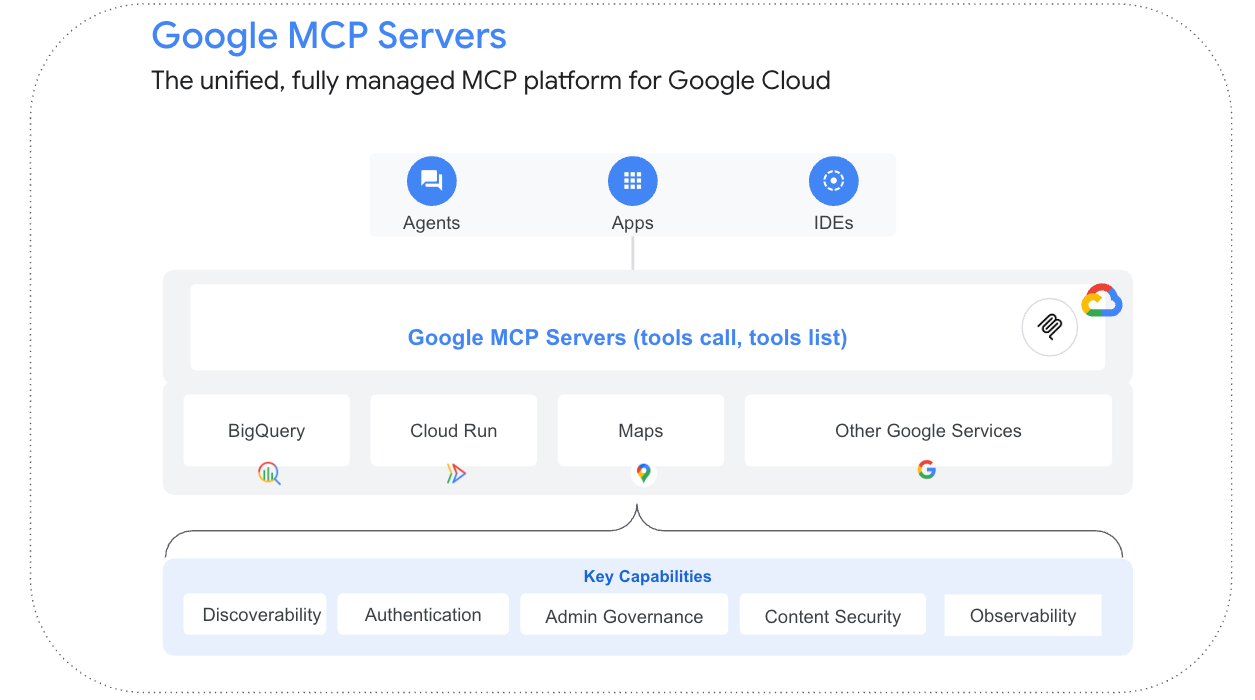
The Model Context Protocol (MCP) is a standard way for AI applications to connect to external tools and context. Think of it as a common socket: the agent does not need custom integration code for every tool provider.
At the protocol level, MCP has three roles:
- Host — the AI application that coordinates one or more MCP clients (in our case, the ADK agent process).
- Client — a connector maintaining a stateful connection to exactly one MCP server.
- Server — a program exposing capabilities. “Server” describes a protocol role, not a deployment location; an MCP server can run as a local subprocess or a remote, independently scaled service.
An MCP server can expose three kinds of capability:
- Tools — executable functions the model can invoke (a database query, an API call).
- Resources — read-only contextual data the application can retrieve (schemas, reference documents).
- Prompts — reusable, server-defined prompt templates.
For local development, stdio is the simple option. For remote services, Streamable HTTP is the pattern to design around. The exact transport details depend on the MCP revision and SDK you use.
What MCP solves
- Integration standardization. One protocol instead of bespoke glue code per tool, per vendor.
- Tool and context portability. A tool built for one MCP host can be reused by any other MCP-compliant host without rewriting the integration.
- Dynamic discovery. Clients can query a server’s available tools at runtime rather than hard-coding a tool list at build time.
What MCP does not solve
The most important security point is also the easiest to miss: an MCP server is not trusted simply because it speaks MCP.
MCP deliberately does not solve several things your production architecture still has to solve:
- Reasoning or planning — MCP doesn’t decide when or why a tool should be called. That’s the model and the agent framework.
- Enterprise authorization — MCP has no concept of “is this user allowed to see this data.” It moves a request from client to server; it does not adjudicate that request.
- Data governance — row-level security, tenant isolation, and data classification are the target system’s responsibility, not the protocol’s.
- Protection against malicious tool behavior — a compromised or malicious MCP server is, per the protocol’s own framing, an arbitrary code-execution path. Nothing in MCP prevents a poorly-vetted server from returning adversarial content designed to manipulate the model on a subsequent turn.
- Prompt-injection defense — MCP transports data; it has no opinion about whether that data contains hostile instructions.
Remember this sentence: MCP standardizes how an agent talks to a tool. It does not decide whether the call should be allowed.
5. ADK + MCP: Follow One Request End to End
Now put ADK and MCP together and follow one request from the user to the data and back.
Inside the ADK process, McpToolset acts as the MCP client. It connects to the configured server, discovers its tool schemas, and presents the approved tools to the agent in the same way ADK presents local tools.
Discovery is not approval. Use tool_filter to expose only the tools this agent actually needs. If the server gains a new tool later, that tool should not silently appear in the model’s menu.
When Gemini chooses a tool, ADK validates the tool and arguments before the MCP client sends the request. The MCP server then runs deterministic code and returns the result for Gemini to explain.
The server still has to enforce its own identity and authorization. Never assume a request is safe just because it came from your ADK agent; another MCP client could reach the same service.

5.1 Hands-on: Build the Smallest Useful ADK + MCP Agent
Before BigQuery, IAM, and deployment enter the picture, build the smallest working version. Seeing one tool call happen makes every later production component easier to understand.
This first version runs the MCP server locally. It exposes one read-only tool. ADK discovers it through McpToolset. Gemini decides when to use it. Nothing else is hiding in the architecture.
A small ADK agent that answers questions such as “What does BigQuery do?” by calling a local MCP tool named
get_gcp_service_info.- Python 3.10+ and a terminal you are comfortable using.
- Basic Python knowledge: functions, imports and virtual environments are enough.
- ADK authentication configured for Gemini.
- No BigQuery or FinOps setup yet — the first example deliberately uses a tiny local dictionary so you can see the protocol before the cloud architecture.
Step 1: Create the project
Use Python 3.10+ and a virtual environment. uv is convenient, but a normal Python virtual environment works too.
[mcp] extra? The standalone MCP Python SDK has moved to a v2 line, but the current ADK MCP integration pins a compatible MCP v1.x range. Installing google-adk[mcp] lets ADK choose that compatible version for this example instead of accidentally mixing incompatible major versions.The example below stays on the ADK-compatible MCP API used by the article. If you build a standalone MCP server outside these compatibility constraints, check the current SDK documentation for the corresponding API.
Step 2: Build the MCP server
Create mcp_server/server.py:
This tiny server demonstrates the key idea: a Python function becomes an MCP tool with a name, description, typed parameters, and a return value that another process can discover.
Step 3: Connect ADK to the MCP server
Create agent/agent.py:
This is the connection point. McpToolset starts the local server over stdio, discovers its tools, and exposes the selected tool to the ADK agent.
Step 4: Run it locally
From the project directory, start ADK’s local development UI:
Open the URL printed by the CLI and try a few simple questions:
- What does BigQuery do?
- What is Cloud Run?
- Tell me about Compute Engine.
Do not only read the final answer. Open the trace and follow the path:
- The user sends a natural-language request.
- Gemini sees the tool definition supplied by ADK.
- Gemini decides that
get_gcp_service_infois relevant. - ADK invokes the MCP client.
- The MCP client sends a
tools/callrequest to the local server. - The MCP server executes the Python function.
- The result is returned to ADK and supplied to Gemini.
- Gemini produces the final response.
If you can see get_gcp_service_info in the ADK trace and can explain which component made each hop, you understand the core ADK + MCP pattern. If you cannot, fix that locally before adding Cloud Run, BigQuery or IAM. More infrastructure only makes a basic integration problem harder to see.
Step 5: See why tool_filter matters
Imagine the MCP server grows to ten tools while this agent still needs only one. Do not expose all ten automatically.
A tool allowlist gives the model a short, intentional menu instead of every capability the server happens to advertise.
Step 6: Move from local MCP to a remote server
Once the local version makes sense, switch the connection from stdio to Streamable HTTP. The agent’s job stays the same; the connection becomes a real network boundary.
For a remote production service, design around the current remote MCP transport supported by your SDK and protect it with proper service authentication.
Step 7: Translate the demo into a FinOps agent
Now replace the learning tool with narrow FinOps capabilities:
| Learning demo | Production FinOps version |
|---|---|
get_gcp_service_info |
get_cost_summary |
| Local Python dictionary | Curated BigQuery FinOps view |
| stdio | Streamable HTTP |
| No authentication | Workload identity / application authentication |
| Single read-only tool | Small allowlisted read-only toolset |
| Local development | Cloud Run or Agent Runtime |
That is the entire bridge from tutorial to production use case: the orchestration pattern stays familiar, while the tool implementation changes from a toy dictionary to governed cloud data.
6. Turn the Learning Demo into a Real FinOps Agent
Now we keep the same ADK + MCP pattern and swap in a real business question.
User: “Why did our Google Cloud costs increase this month?”
To answer that safely, the agent needs to do a small number of clear jobs:
- Parse the request — this month vs. last month is the implicit comparison.
- Resolve which billing accounts, projects, or folders the requesting user is authorized to see (this resolution happens outside the model, using the caller’s actual identity — never a scope the model infers from the prompt).
- Retrieve current-period and prior-period aggregate costs for the authorized scope.
- Break the comparison down by service, project, and SKU to find the largest deltas.
- Check whether credits, commitments, or pricing changes — rather than usage growth — explain some or all of the movement.
- Produce an evidence-based explanation, citing the specific services and magnitudes involved.
- Offer recommendations, without taking any action itself.
Notice the split: identity resolution, data retrieval, filtering, and arithmetic are deterministic. Gemini’s main job is to understand the question and explain the retrieved result.

Data foundation
Google Cloud Billing can export cost data to BigQuery throughout the day in multiple formats.
- Standard usage cost data — services, SKUs, projects, labels, locations, costs, credits, adjustments, and currency.
- Detailed usage cost data — everything in the standard export plus resource-level granularity for supported services (individual VMs, disks, and so on).
- FOCUS usage cost data — billing data normalized to the vendor-neutral FinOps Open Cost and Usage Specification (FOCUS) and exported to BigQuery through Google’s FOCUS export workflow.
FOCUS can be attractive when portability across billing systems matters. Standard or detailed billing export may still be the simpler fit for Google-Cloud-specific analysis. The choice should follow the reporting model you actually need.
Recommended project structure
config.py and requirements.txt are left out of the main flow because they are ordinary environment and dependency configuration. The architecture is in the agent, tool contract, and data boundary.
The tool surface
The MCP server should expose a small set of narrow, typed FinOps operations rather than a general query endpoint.
| Tool | Purpose |
|---|---|
get_cost_summary |
Aggregate cost for a period and scope |
get_cost_delta_by_service |
Cost change broken down by service, current vs. prior period |
get_cost_delta_by_project |
Same breakdown, by project |
get_billing_credits_and_adjustments |
Explains whether credits or adjustments are masking or amplifying a change |
Each tool accepts bounded fields such as dates, billing account, project, and result limits. It should never accept a free-form SQL string from the model. That rule is part of the security design, not just coding style.
7. Build the FinOps MCP Server
The MCP server is where the model’s request becomes deterministic code. In this article, the ADK-compatible MCP Python API exposes ordinary Python functions as tools with very little boilerplate.
mcp_server/queries.py builds parameterized BigQuery queries. User-controlled values stay out of the SQL string and are passed as bound query parameters.
mcp_server/server.py exposes those safe operations as MCP tools:
Three design choices matter more than the amount of code:
- The tool signature is the contract.
get_cost_delta_by_service(billing_account_id, start_date, end_date, result_limit)— every parameter is typed, every parameter is bounded (noteresult_limitis clamped server-side even though the tool docstring already says 1–50; never rely on a description alone to enforce a range), and there is no parameter through which arbitrary SQL, or anything resembling it, can enter. - Authorization is checked in the tool, not assumed from context.
_authorize_scopeis a stub here, but the call site matters: it happens inside the server, using the billing account the caller explicitly provided, before any query runs. - The result carries provenance. Returning
queried_atandsourcealongside the data lets the agent (and a human reviewing its answer later) know exactly what was queried and when — which matters when someone asks “was this based on today’s numbers?”
8. Connect the FinOps Tools to ADK
On the agent side, McpToolset is the MCP client. It manages the connection, discovers tools, translates schemas, and makes the approved tools available to the LlmAgent.
Four implementation choices deserve attention:
gemini-flash-latestis convenient for learning and iteration. ADK documentation uses this selector in many examples. In a production release, treat a model change like any other dependency change: run your evaluation suite and decide whether you want the flexibility of an alias or the predictability of a specific supported model identifier.tool_filteris more than tidiness. Even if the MCP server is read-only today, an allowlist at the ADK layer prevents a tool added to the server next month from silently becoming visible to this agent.- Authentication belongs in the connection and service layers, not in the prompt. The token in this sample is intentionally shown as an environment variable. In production, prefer short-lived workload identity or an equivalent managed credential flow rather than a long-lived bearer token stored in configuration.
- Use stdio to learn; use a remote transport when the server becomes a service. stdio is excellent for a local child process. Once multiple agent instances need the same MCP server, Streamable HTTP gives you a proper network boundary that can be independently authenticated, governed and scaled.
9. Security: Let the Model Suggest, Let Code Decide
Up to this point, we have made the agent work. This section is about making sure the same working agent cannot quietly become a security problem.
Use one rule everywhere: the model may reason about an action, but code and policy decide whether the action is allowed.
Identity and least privilege
Run the deployed agent under its own workload identity. Give it only the roles needed for the curated FinOps data it should read. If the first version never writes, do not grant write access “for later.”
Parameterized tools, not arbitrary SQL
Do not expose a tool such as get_cost(sql: str). That would let model-generated text control the query directly. Keep tools typed and bounded. If you later need more flexibility, build a constrained query layer with approved fields and operators.
Prompt injection
Prompt injection happens when text inside data is mistaken for instructions. A billing label, resource description, or other user-controlled field can become hostile input if the model is allowed to treat retrieved content as commands.
The useful defenses are layered:
- Treat retrieved content as data, never as instructions, at the prompt-construction level.
- Keep the tool surface narrow. A model that only has read-only cost-analysis tools available has a much smaller blast radius if it’s successfully manipulated than one with a general-purpose toolset.
- Inspect content at the boundary. On Google Cloud, this is Model Armor, which — as of its June 2026 general-availability release on Agent Gateway — can screen both inbound prompts and outbound MCP tool calls and responses for prompt injection, jailbreak attempts, and sensitive-data leakage, configured through project-level floor settings or per-gateway templates. It’s a layer, not a guarantee: enable it, but don’t treat a clean Model Armor verdict as proof an interaction was safe.
Tool poisoning
Tool poisoning is different: the MCP server or the tool metadata itself becomes the source of risk. A compromised server can advertise misleading tools or return content designed to influence the next model turn.
Treat MCP servers as governed dependencies. Register and approve them, review tool-list changes, use allowlists, and keep service identities separate.
Authorization stays outside the model — always
A tool call that completed successfully is not the same thing as an authorized action. Authorization must be enforced by IAM, the MCP service, the gateway, or another deterministic policy layer.
Read-only first
The safest first production version of this FinOps agent is read-only. It can explain. It cannot change budgets, labels, projects, or infrastructure. Add write paths only after the read path has earned trust.
10. Evaluation: Prove the Agent Does the Right Thing
A successful demo proves the idea can work. An evaluation suite proves the behavior is repeatable enough to release.
Build a small golden dataset around the real questions your FinOps users will ask. Each case should tell you what the correct tool, arguments, and grounded answer should look like.
- The user’s question.
- The expected tool the agent should call.
- The expected arguments to that tool.
- The expected data-backed answer, or an acceptable range for it.
- Adversarial variants — a question with an injected instruction embedded in it, a question asking for a scope the test user isn’t authorized for, a question with an ambiguous date range.
Evaluate two different things because they catch different failures:
- Trajectory evaluation — did the agent select the correct tool, in the correct order, with the correct arguments? This catches errors that would otherwise be invisible in a passing-looking final answer: a plausible-sounding explanation built from the wrong data.
- Response evaluation — is the final answer grounded in the retrieved data, numerically accurate, and appropriately scoped? This catches the model producing a fluent answer that doesn’t actually follow from what the tools returned.
A minimal test case can look like this:
Run evaluations during development, in CI whenever the prompt, model, tool schema, or agent logic changes, and against a controlled sample of production traffic. That last step is how you catch drift after release. Set release thresholds and treat meaningful regressions as blockers.
11. Observability: Be Able to Explain Every Answer
Evaluation asks, “Did we build the right behavior?” Observability asks, “What happened on this specific request in production?”
Give each request one trace or correlation ID and carry it through the user request, ADK runtime, Gemini call, gateway, MCP server, and BigQuery query. That turns a bad answer into something you can investigate instead of guess about.
At minimum, capture:
- Request ID, session ID, and the authenticated user or tenant identity.
- Agent version, model and model version, and prompt/instruction version — so a regression can be traced to a specific change.
- Which tool was called, with which server, and (after redaction) which arguments.
- The authorization decision made at the tool layer.
- Model latency, tool latency, and total end-to-end latency, tracked separately.
- Token usage per model call.
- BigQuery bytes processed per query — this is both a cost signal and, if it spikes unexpectedly, a sign that a query template has degraded or a
LIMITisn’t being enforced. - The final outcome and, where available, an evaluation or safety score.
Do not log sensitive prompts, tool arguments, or model outputs blindly. Redact what you do not need, separate audit data from general application logs, and remember that a clean error log does not prove the agent is answering correctly.
12. Deployment: Put Each Component in the Right Place

The easiest deployment mistake is assuming every component should run in the same place. They have different jobs, so give them the runtime that fits the job.
Agent Runtime is the managed agent runtime described in the article for the ADK application. Use the current Google Cloud product terminology when you design and document the system, even if older command or API names still appear for compatibility.
Cloud Run is a natural fit for the MCP server because the server is a stateless network service. It can scale independently from the agent and does not need an agent-specific runtime.
GKE makes sense when your organization already operates Kubernetes or needs Kubernetes-specific deployment patterns. It is not a requirement for a first production agent.
The ADK application runs the agent logic; the MCP server runs the tools. Plan the access and deployment requirements for each.
mcp.run() example is a local stdio development server. Before putting the MCP server on Cloud Run, switch it to the remote Streamable HTTP pattern supported by the MCP SDK and make the process listen on the platform-provided port.Whichever runtime you choose, deploy immutable revisions, keep development/staging/production separated, and make rollback part of the release process rather than an emergency improvisation.
13. Production Architecture: Core System + Guardrails
Read the architecture in two layers: the components that process a request and the controls that govern their operation.
ADK
Reasoning, orchestration, sessions, callbacks and tool selection
MCP
Standardized connectivity between the agent and external tools/data
Security boundary
Identity, IAM, authorization, validation and policy enforcement
Data / APIs
Deterministic business operations and source-of-truth data
Layer 1: the core agent system. These are the components required to answer the question at all.
The core includes the ADK agent, Gemini, the MCP client/server path, and the underlying FinOps data.
Layer 2: production guardrails. These controls make the same core system safe, governable, and diagnosable for enterprise use.
In this design, services such as Agent Gateway, Agent Registry, Model Armor, IAM, logging, and tracing belong to that outer control layer. Their job is not to make Gemini smarter; their job is to constrain, inspect, authorize, and explain the system around Gemini.
14. ADK, MCP, and A2A: Three Different Jobs
ADK, MCP, and A2A sound related because they all appear in agent architectures. They are not substitutes.
| Technology | Primary purpose | Solves | Does not solve |
|---|---|---|---|
| ADK | Agent development and orchestration | Building agents, tools, sessions, callbacks, evaluation, deployment | Does not automatically make tools safe or define enterprise authorization |
| MCP | Tool and context connectivity | Standardized discovery and invocation across tools and data sources | Does not define agent reasoning, identity policy, or business workflows |
| A2A | Agent-to-agent communication | Independently deployed agents discovering, negotiating with, and delegating to each other | Does not replace agent frameworks, tool protocols, or IAM |
Use ADK to build and orchestrate an agent. Use MCP when the remote thing is a tool or data source. Use A2A when the remote thing is another independent agent with its own reasoning and lifecycle.
For this first FinOps agent, MCP is enough. A2A becomes relevant later if the FinOps agent needs to collaborate with separately owned agents, such as a compliance or procurement agent.
15. Production Readiness Checklist
Before you write the production version
Before you deploy
Before you open it to production users
After go-live
16. Common Mistakes to Avoid
- Treating MCP as a security mechanism. It standardizes transport, not trust.
- Giving the agent’s service account broad or project-wide roles instead of scoped, dataset-level access.
- Building a tool that accepts raw, model-generated SQL — the single most consequential mistake on this list.
- Designing the system as if the model will self-limit its own tool calls to what’s “appropriate.” It won’t reliably do that, and you have no way to prove it did.
- Skipping evaluation because the demo worked. A passing demo and a production-ready trajectory-and-response evaluation suite are not the same evidence.
- Treating “no errors in the logs” as proof of correct behavior, instead of instrumenting for drift and sampling real traffic.
- Adding write capability before the read-only version has been stable in production for a meaningful period.
- Registering every tool an MCP server advertises, instead of allowlisting the specific subset a given agent actually needs.
- Using the conversation transcript as a system of record for any fact that matters — cost figures, approvals, decisions.
- Building around “Vertex AI Agent Engine” as the current product name when current Google Cloud documentation has moved to Agent Runtime under the Gemini Enterprise Agent Platform.
- Run the minimal ADK + MCP example locally.
- Inspect exactly which tools the MCP server exposes.
- Apply an explicit tool allowlist.
- Replace demo data access with authorized, parameterized queries.
- Add tests for tool choice, arguments, and final answers.
- Only then move the agent and MCP server to managed production infrastructure.
17. Review Before Moving Beyond the Tutorial
The path from prototype to production is not “use a bigger model” or “add more tools.” It is make every boundary explicit.
In this architecture, Gemini reasons. ADK runs the agent application. MCP gives the agent a standard path to tools. Google Cloud identity, gateway, evaluation, and observability controls enforce the decisions the model must never be trusted to enforce for itself.
The FinOps agent is deliberately small: one question, one data domain, and read-only access. That is a strength. A narrow agent you can explain and govern is a much better production foundation than a broad agent whose actions are difficult to account for.
Once the read-only version is stable, the next challenge is the write path: human approvals, transaction controls, rollback, stronger evaluation, and audit requirements for actions that change something real.
Sources
Google Cloud — Gemini Enterprise Agent Platform
- Agent Platform overview — Build/Scale/Govern/Optimize structure
- Agent Runtime — managed runtime capabilities and terminology
- Agent Gateway overview — ingress/egress modes, Agent Identity, Agent Registry integration
- Configure Model Armor on a gateway
- Use the Agent Platform remote MCP server — Model Armor MCP floor settings
- Introducing Gemini Enterprise Agent Platform
Google ADK
- ADK documentation — MCP tools —
McpToolset, connection params, deployment patterns - ADK Python repository
- ADK documentation home
Model Context Protocol
- MCP architecture overview
- MCP specification (2026-07-28)
- MCP Python SDK — current v2 documentation and migration guidance
- Google ADK Python dependency metadata — current MCP compatibility range used by the ADK integration
A2A
Google Cloud Billing / FinOps